• Free Chrome extension
  • Works with your own AliExpress codes
  • No account data stored

Stop leaving AliExpress store coupon codes unused at checkout

AliCheckout quietly collects the seller coupon codes that AliExpress already shows in your account, remembers them in your browser, and applies the best valid one at checkout with a single click. Nothing is hacked, nothing is faked – the code goes into AliExpress' own promo field, exactly as if you had typed it yourself.

Chrome desktop · Manifest V3English interface · built for EU shoppersTypical savings: €0.90 – €5 per order

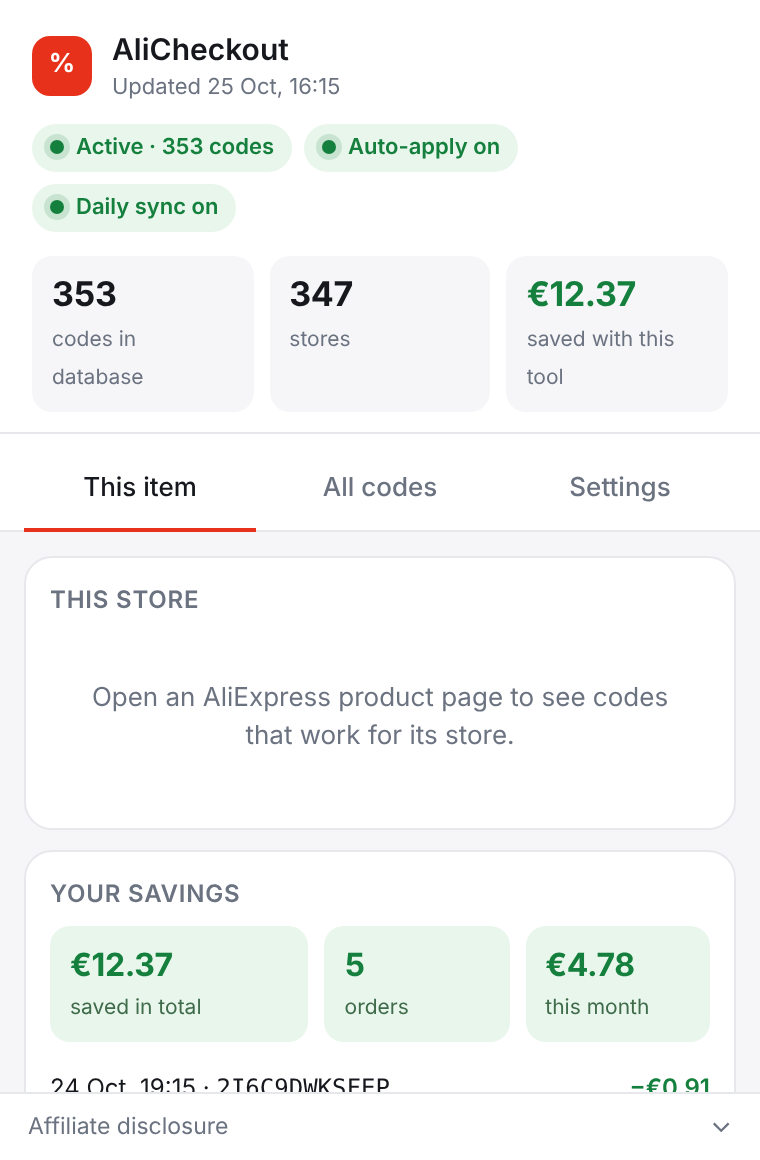
The AliCheckout popup showing status pills, the number of codes in the database, and codes available for the current store
The problem

AliExpress gives you store codes. Then it makes you hunt for them.

If you shop on AliExpress regularly, you have almost certainly collected coupon codes from sellers without noticing – a "€2.87 off orders over €43" here, a "€1.09 off" there. They live in your coupon center and in small coupon panels on product pages. Most of them expire without ever being used, simply because nobody remembers which store gave which code, what the minimum order was, or whether it is still valid when the order is finally placed.

Codes are scattered

Store codes appear in at least two different places: the coupon center inside your account and the coupon panel on individual product pages. There is no single list you can check while you are in checkout.

Every code has fine print

Almost every store code comes with a minimum order value and an expiry date. A code that worked on Monday may be useless on Friday, or may need €4 more in the basket before it will apply.

Checkout is the wrong moment to search

By the time you reach the order confirmation page you want to pay, not open five tabs to re-read coupon conditions. So most people press "Place order" and leave the discount on the table.

How it works

Four quiet steps, and the right code is waiting for you at checkout

AliCheckout does not add a new shopping flow. It simply makes sure that the codes you already own are visible where you need them, and that applying them takes one click instead of a search.

1

Collect your store codes – at most once a day

When you turn on "Collect new codes daily", AliCheckout opens a brief AliExpress window for a few seconds, reads the store coupon codes that AliExpress shows in your own account – in the coupon center and in the product coupon panels you have visited – and then minimizes the window. Collection runs at most once a day, and you can also start it manually from the popup with "Collect codes now". Only the coupon fields are stored: the code itself, the discount, the minimum order amount, the store, and the validity date. Nothing about your account, your orders or your payment details is read or saved.

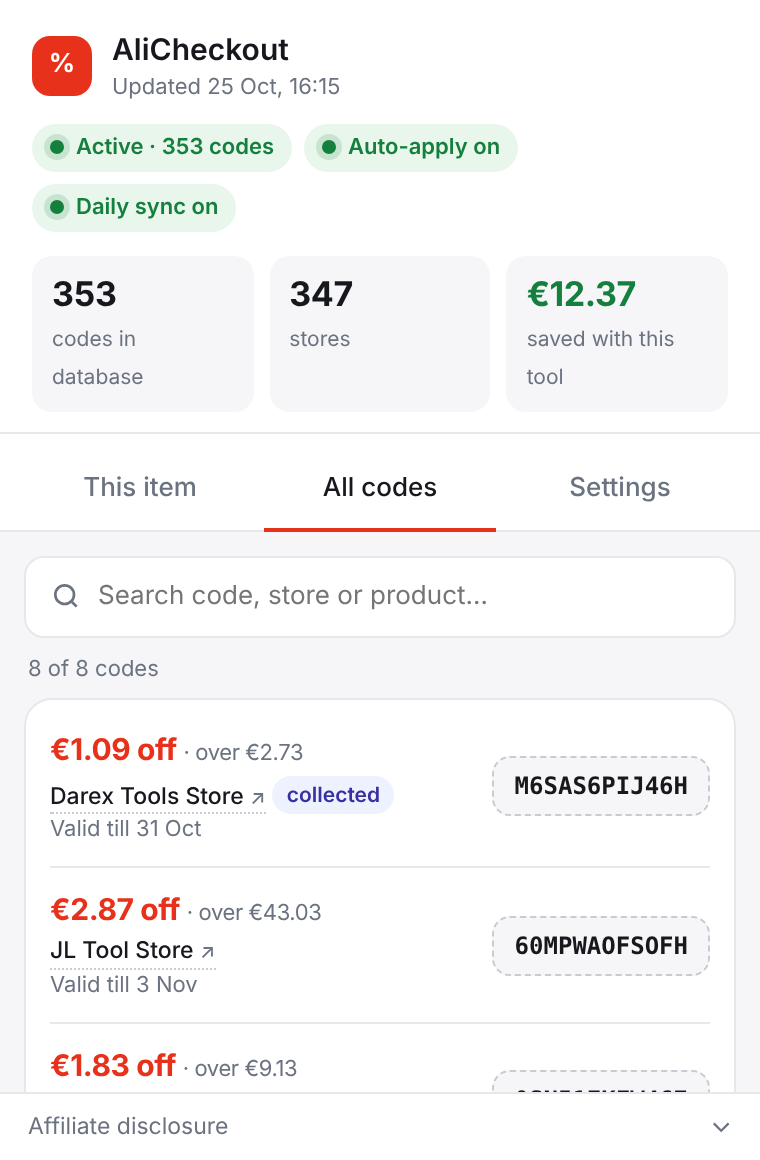
The All codes tab in the popup: a searchable list of collected store coupon codes with store names, discounts, minimum order values and valid-till dates
2

See a one-line hint on every product page

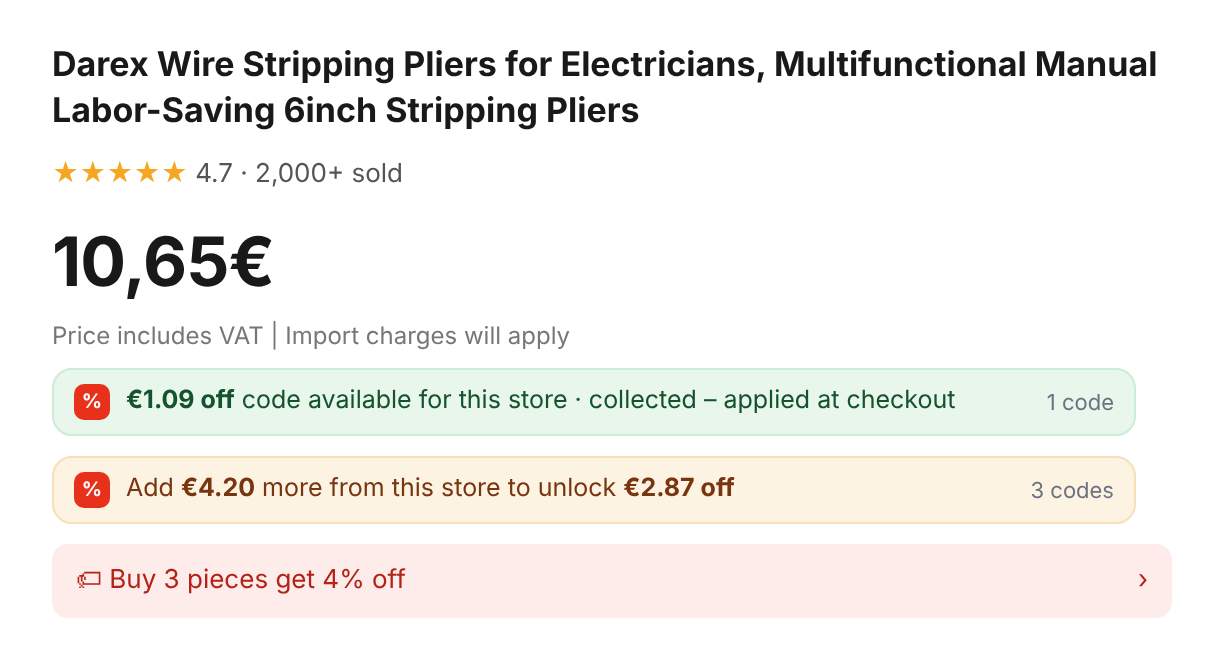
While you browse, AliCheckout adds a single line under the price that tells you where you stand with that store. If a code already works at the current price you will see something like "€1.09 off code available for this store – applied at checkout". If you are close to a threshold, the hint tells you exactly how much more to add: "Add €4.20 more from this store to unlock €2.87 off". The extension icon in the toolbar also shows a badge with the number of codes for that store, and the badge turns green when at least one of them works at the current price.

A one-line hint under an AliExpress product price reading: €1.09 off code available for this store – applied at checkout
3

Get a coupon panel directly under "Promo codes" at checkout

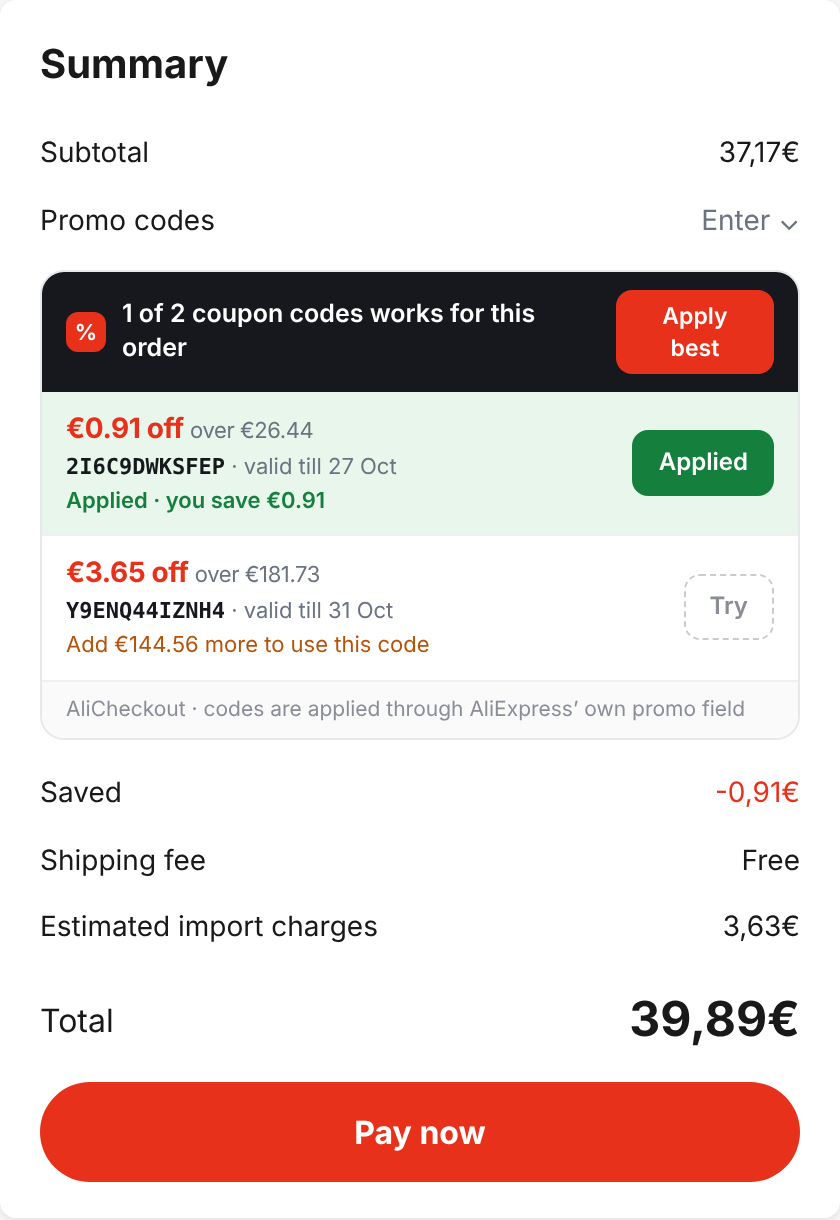
On the order confirmation page, a compact panel appears right under AliExpress' own "Promo codes" field. It lists every code AliCheckout knows for the stores in your order, with the discount, the minimum order amount, the code itself and the "valid till" date. If your basket changes – you adjust a quantity, remove an item – the panel recalculates immediately so the information you see always matches the order you are about to place.

The AliCheckout coupon panel in AliExpress checkout listing store codes with discount, minimum order, code and valid-till date, with Apply and Apply best buttons
4

Click Apply (or Apply best) and watch the real result

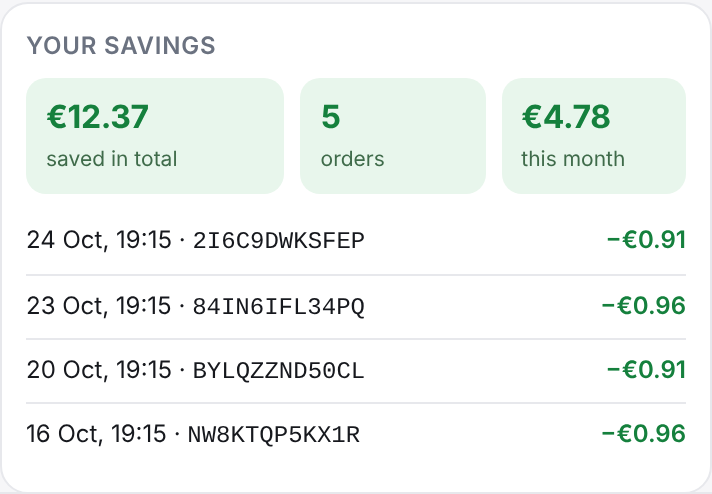
One click on Apply enters the code into AliExpress' promo field and presses AliExpress' own Apply button. Apply best does the same for the code with the biggest discount that is actually valid for your order. The panel then shows you what really happened – "Applied · you save €0.96", or AliExpress' own message if the order is below the minimum, or a note that the code was already applied. Your savings are added to the "Your savings" card so you can see over time what the tool has actually done for you.

The Your savings card showing total saved, number of orders, savings this month and a list of recently applied codes
60-second explainer

See the whole flow in one minute

From the first product page hint to the "Applied · you save" message at checkout. A two-minute walkthrough of every screen you will see with the extension installed.

Music: "A Better Future" by Bluewave, via freetouse.com.

What you see at checkout

The checkout panel, explained in detail

Checkout is where AliCheckout earns its keep, so it is worth describing precisely what the panel does, what it shows, and what it deliberately does not do.

Close-up of the AliCheckout checkout panel showing a list of store codes with discount amounts, minimum order values, the code strings and valid-till dates

Where the panel appears and what each row means

The panel is injected directly under the "Promo codes" section of the AliExpress order confirmation page – the same place where you would normally type a code by hand. It does not cover any of AliExpress' own controls and it does not change the layout of the price summary.

Each row in the panel corresponds to one store code and shows four things: the discount (for example "−€2.87"), the minimum order value the store requires ("orders over €43"), the code string itself, and the "valid till" date so you know how long the code will remain usable. Rows are grouped by the stores in your current order, so you never see codes for sellers that are not part of this checkout.

A row that works at the current basket total is marked clearly and gets an Apply button. A row whose minimum has not been reached tells you how much more you would need to add from that store to unlock it – for instance "Add €4.20 more from this store". Nothing is hidden: if a code is not usable right now, you can still see it and understand why.

The savings card with totals and recent applied codes after a successful apply at checkout

Apply, Apply best, and the honest result line

When you click Apply, AliCheckout types the code into AliExpress' own promo field and presses AliExpress' own Apply button. That is the whole mechanism. There is no interception of prices, no modification of the order total, no request sent to any server of ours. AliExpress validates the code exactly as it would if you had typed it, and AliExpress decides whether to accept it.

Apply best looks at the rows that are valid for your current total, picks the one with the largest discount, and applies it. If you have several codes for the same store, this saves you from having to compare them yourself.

After the click, the panel reports the real outcome rather than a hopeful guess. These are the messages you can see:

  • Applied · you save €0.96The code was accepted by AliExpress and the order total has been reduced by the amount shown.
  • AliExpress' own messageIf AliExpress rejects the code – for example because the order is below the minimum, or the code has expired since collection – the panel shows AliExpress' exact response, not a paraphrase.
  • Already appliedThe code you clicked is already active on this order, so nothing changed.
  • AliExpress kept your current coupon (−€3.01) – it saves more. Only one store coupon applies per order.AliExpress allows a single store coupon or code per store per order. If the one already on your order is better than the one you tried, AliExpress keeps the better one and AliCheckout tells you so instead of pretending something happened.
Product page hint telling the shopper to add €4.20 more from this store to unlock €2.87 off

When your order is below every threshold

Sometimes none of the codes for a store can be applied yet because your basket for that store is too small. In that case the panel does not go blank. The header changes to "N coupon codes may be available if you order more items", and each row states how much more you would need to add from that store to reach its minimum. You can then decide whether adding another item is worth it – often it is, because the discount can be larger than the price of a small extra accessory – or you can simply place the order as it is.

Because AliExpress checkout lets you change quantities on the confirmation page, AliCheckout watches those changes and recalculates the panel on the spot. Add one more unit and a code that was out of reach can become applicable instantly; the row updates, the Apply button appears, and you can use it right away.

Background

Why AliExpress store codes are so hard to use well

To understand what AliCheckout fixes, it helps to understand how AliExpress coupons actually work. There are several different kinds, and store codes are the most fragmented of them all.

The coupon center is a drawer, not a dashboard

Inside your AliExpress account there is a coupon center that lists the coupons and codes you have collected. It is useful for seeing that you have something, but it is organised around the coupons, not around your shopping. When you are on a product page or in checkout, the coupon center is several clicks away, and it does not tell you which codes apply to the stores in your current basket. AliCheckout reads this list for you and reorganises it by store, which is the only grouping that matters at checkout.

Codes are issued per store, not per marketplace

Unlike platform-wide promotions, store coupon codes are created by individual sellers and only work in that seller's shop. A code from one electronics store is worthless for a different electronics store that sells the identical product. With thousands of sellers on the platform, your personal collection of codes is effectively a long list of tiny, store-specific rules – exactly the sort of thing a human forgets and a small local database does not.

Minimum order amounts change the calculation

A typical store code reads "€2.87 off orders over €43" or "€1.09 off orders over €15". The minimum is counted per store, not for your whole basket, so adding an item from a different seller does not help. This is why AliCheckout always talks about "more from this store" and never about your total order value. It also explains why the product page hint can say "Add €4.20 more from this store to unlock €2.87 off" – it has already subtracted the current item price from the store minimum.

Expiry dates make yesterday's list unreliable

Store codes have validity windows that are often short – days or a couple of weeks. A screenshot or a note you wrote earlier becomes stale quickly. AliCheckout stores the "valid till" date with every code, shows it in the popup and in the checkout panel, and refreshes the collection at most once a day so the list stays reasonably current without hammering AliExpress with requests.

Only one store coupon or code applies per store per order

AliExpress applies at most one store coupon or store code per store in an order. If a store coupon has already been added automatically, trying a store code for the same seller will not stack on top of it. AliCheckout respects this rule rather than fighting it: when AliExpress keeps a better coupon that is already on the order, the panel says so plainly. The goal is to make sure the best single store discount is used, not to invent stacking that the platform does not allow.

"Choice" items usually have no store codes

Items labelled "Choice" or "Shipped by AliExpress" are fulfilled through AliExpress' own logistics programme and typically do not come with seller-issued coupon codes. If your basket consists entirely of Choice items, it is normal for the panel to show nothing and for the product hint to be absent. This is not a bug in the extension; there is simply no store code to apply. Store codes are most common on items sold and shipped by independent sellers.

Features

Everything the extension does – and nothing it doesn't

AliCheckout is intentionally small. Each feature below is something you can see in the popup, on a product page or at checkout today.

Daily code collection

Collects store codes from your coupon center and the product coupon panels you have seen, at most once a day. A short AliExpress window opens for a few seconds and then minimizes. Toggle it off any time.

Product page hint

One unobtrusive line under the price: either the discount available for this store, or how much more you need to add from the store to unlock it. The toolbar badge shows the number of codes and turns green when one works.

Checkout coupon panel

Codes for the stores in your order, listed under "Promo codes" with discount, minimum, code and valid-till date. Recalculates as you change quantities.

Apply and Apply best

One click enters the code into AliExpress' promo field and presses Apply. "Apply best" picks the largest valid discount. The panel shows the real result from AliExpress.

"This item" tab

Open the popup on any product page and see the codes for that store, each with a "works for this item" or "add €X more" badge and its validity date.

"All codes" tab

A searchable list of every code in your local database. Store names link to the store page, so you can jump straight to a shop where you know a discount is waiting.

Status at a glance

Status pills show "Active · N codes", "Auto-apply on" and "Daily sync on". KPIs show codes in the database, the number of stores and the total saved with this tool.

Your savings card

Saved in total, number of orders, savings this month and your most recently applied codes – based on the results AliExpress actually returned, not estimates.

Simple settings

Three controls: "Collect codes now", "Auto-apply at checkout" and "Collect new codes daily". No accounts, no sign-up, no configuration screens.

Honest expectations

Does it really save money?

Yes – but modestly, and only when a store code exists for the seller you are buying from. We would rather tell you the real numbers than promise a miracle.

Store coupon codes on AliExpress are usually small, fixed-amount discounts tied to a minimum order value. In practice the codes you will see most often look like these:

Typical codeWhat it means for you
€1.09 off, no stated minimumWorks on almost any item from that store; a small but free discount.
€2.87 off orders over €43Worth adding a second item if you were going to buy it anyway.
€3.01 off orders over €50Often appears as a store coupon AliExpress applies on its own; AliCheckout will not replace it with a worse code.
€5 off orders over €80Larger stores occasionally issue these; the panel will tell you how far away you are.

Across ordinary orders, you should expect to save somewhere between €0.90 and €5 per order when a code applies. On a €20 order a €1.09 code is roughly five percent; on a €45 order a €2.87 code is about six percent. These are not life-changing sums, but they add up over a year of regular purchases, and they cost you nothing but a click.

What AliCheckout cannot do

  • It cannot create codes that the seller did not issue. If a store has no code in your account, there is nothing to apply.
  • It cannot stack several store codes for the same store. AliExpress allows one store coupon or code per store per order, full stop.
  • It cannot override AliExpress' decision. If AliExpress rejects a code, the panel shows AliExpress' message and the price stays as it was.
  • It cannot lower a price below the minimum-order rule. "€2.87 off orders over €43" means exactly that, per store.
  • It does not touch platform coupons, "select coupons", shipping discounts or payment promotions. Those continue to work exactly as before, independently of the extension.

How the savings number is calculated. After every Apply, AliCheckout reads the result AliExpress returns and records the discount amount only if the code was actually accepted. The "Saved with this tool" KPI in the popup and the "Your savings" card are sums of those real amounts. Rejected and already-applied codes add nothing.

The Your savings card: saved in total, orders, this month and recently applied codes

A worked example

You are buying a €39.80 phone case from a store that gave you a "€2.87 off orders over €43" code. On the product page AliCheckout shows "Add €3.20 more from this store to unlock €2.87 off". You add a €3.50 screen protector from the same store. At checkout the panel row turns applicable, you press Apply, and the result reads "Applied · you save €2.87". Net effect: you got the screen protector for €0.63.

If instead you decide not to add anything, the header says "1 coupon code may be available if you order more items" and you place the order at €39.80 as planned. Either way, you knew your options before you paid.

FAQ

Frequently asked questions

Straight answers about privacy, how collection works, what the extension can and cannot do, and how to remove it if you change your mind.

What data does AliCheckout store, and where?

AliCheckout stores coupon fields only: the code string, the discount amount, the minimum order amount, the store it belongs to and the validity date. This data lives in a local database inside your browser, on your computer. It is not uploaded to our servers – we do not operate a server that receives your coupon data – and it is not shared with third parties. No account information, order history, address, payment details or browsing history is collected. See the privacy policy for the full picture.

How does code collection actually work?

When collection runs, the extension opens a brief AliExpress window – it stays visible for a few seconds and then minimizes – and reads the store coupon codes that AliExpress displays to you in your own account: the coupon center and the coupon panels on product pages you have visited. It then saves the coupon fields to the local database and closes the window. This is the same information you would see if you opened the coupon center yourself; the extension simply reads it so you do not have to. Collection only works when you are logged in to AliExpress in that browser, because the coupon center is part of your account.

Why only once a day? Can I collect more often?

Automatic collection runs at most once every 24 hours. We chose this on purpose: it keeps the list reasonably fresh without opening AliExpress windows repeatedly or generating unnecessary traffic. If you have just collected a new code and want it in the database immediately, open the popup, go to Settings and press "Collect codes now". You can also switch "Collect new codes daily" off entirely and only collect manually.

Does it work on "Choice" or "Shipped by AliExpress" items?

Usually not, and this is not a limitation of the extension. Items in the Choice programme are fulfilled by AliExpress itself and typically do not carry seller-issued store codes. If your order contains only Choice items, the checkout panel will often have nothing to show and the product page hint will be absent. Store codes are most common on products sold and shipped by independent sellers, where the seller has issued a coupon code for their shop.

Does the extension change prices or manipulate the page?

No. AliCheckout never modifies prices, totals or any order data. The only interaction with the checkout page is this: when you click Apply, it types the code into AliExpress' own promo code field and presses AliExpress' own Apply button. AliExpress then validates the code and updates the total itself. If AliExpress rejects the code, nothing changes and the panel shows you AliExpress' message. The product page hint and the checkout panel are purely informational overlays – they display information, they do not alter the store's page content.

What happens if a code fails?

The panel tells you exactly what AliExpress said. The most common reasons are that the order for that store is below the code's minimum, that the code expired after it was collected, or that AliExpress has already applied a better store coupon to the order and will not replace it – in which case the panel says "AliExpress kept your current coupon (−€X) – it saves more. Only one store coupon applies per order." You can then try a different row, add an item to reach the minimum, or simply proceed without the code. A failed Apply never affects your order or your ability to pay.

Which countries and currencies does it support?

AliCheckout works on aliexpress.com with an English interface and was built with EU shoppers in mind, so our examples use euros. The extension reads the discount and minimum values that AliExpress shows you in your own account currency, so it will display whatever currency your AliExpress settings use. We test primarily with EUR; if you shop in another currency and notice a display issue, please write to info@alicheckout.com. Regional AliExpress domains and non-English interfaces are not officially supported at this time.

Do I need to be logged in to AliExpress?

Yes, for collection. Store codes are tied to your AliExpress account, so the extension can only read them when you are logged in to AliExpress in the same browser. The extension does not have your AliExpress password and never asks for it – it relies on the session that already exists in your browser, exactly as any tab you open yourself would. Once codes are in the local database, the product hints and checkout panel show them whenever you browse, as long as you are logged in to complete an order anyway.

Is AliCheckout really free? What is the catch?

It is free to install and use, with no premium tier, no subscription and no hidden paywall. The extension uses AliExpress affiliate links. If you buy through these links, we may earn a small commission at no extra cost to you – the price you pay is identical whether the affiliate link is used or not, and the commission is paid by AliExpress, not by you. That is how the development of the extension is funded, and we say so openly on this page and in the extension.

How exactly do the affiliate links work?

When you visit AliExpress with AliCheckout installed, the extension may attach an affiliate identifier to AliExpress links so that AliExpress knows the visit was referred by this tool. If you then make a purchase, AliExpress pays us a small percentage of the order value as a commission. This does not change the product price, shipping cost, coupon eligibility or any other term of your order. The affiliate programme is operated by AliExpress and governed by its own terms; AliCheckout is an independent participant in that programme and is not affiliated with, endorsed by or sponsored by AliExpress or Alibaba Group.

Does it work on mobile?

No. AliCheckout is a Chrome extension for desktop browsers. Chrome on Android and iOS does not support browser extensions, so the extension cannot run there. It should work in other Chromium-based desktop browsers that support Manifest V3 extensions, but we test and support Google Chrome on desktop specifically.

Does it place orders or handle payments?

Never. The extension does not click "Place order", does not interact with payment methods, does not read card or wallet details and does not change shipping options. Its interaction with the checkout page is limited to filling the promo code field and pressing Apply when you ask it to. Every decision to buy remains yours.

Will my existing AliExpress coupons still work?

Yes. Platform coupons, select coupons, store coupons that AliExpress applies automatically, shipping promotions and payment-method discounts all continue to work exactly as before. AliCheckout only deals with store coupon codes entered through the promo field. If AliExpress has already applied a store coupon that saves more than the code you try, AliExpress keeps the better one and the panel tells you so.

How do I uninstall AliCheckout?

Right-click the AliCheckout icon in the Chrome toolbar and choose "Remove from Chrome", or open chrome://extensions, find AliCheckout and click "Remove". Removing the extension deletes its local database, including all collected codes and your savings history, from your browser. There is nothing to cancel and no account to close, because the extension never created one.

Privacy summary

Local by design

The short version of our privacy policy. The extension was built so that there is very little to say here.

What the extension stores

  • Coupon code strings
  • Discount amounts
  • Minimum order amounts
  • The store each code belongs to
  • Validity ("valid till") dates
  • Your own settings and a local ledger of codes that were successfully applied

All of this lives in a local database in your browser and is removed when you uninstall the extension.

What the extension does not do

  • Store your AliExpress login, password or account details
  • Read or save your order history, addresses or payment information
  • Upload your coupon database to our servers or anyone else's
  • Track your browsing outside aliexpress.com
  • Sell or share data with advertisers or data brokers
  • Place orders, change shipping, or interact with payment

Affiliate disclosure

This extension uses AliExpress affiliate links. If you buy through these links, we may earn a small commission at no extra cost to you. The commission is paid by AliExpress; it does not change the price you pay, your coupon eligibility or any other term of your order. AliCheckout is an independent tool and is not affiliated with, endorsed by or sponsored by AliExpress or Alibaba Group. "AliExpress" is a trademark of its respective owner and is used here only to describe compatibility.

Use the codes you already have

Install AliCheckout, let it collect your store codes once a day, and press Apply the next time you check out. If it never finds a code for the stores you shop at, uninstall it in two clicks – nothing is left behind.